SUSE Studio is out - The Linux Appliance Builder
Update: Nat Friedman has written two great blog posts on SUSE Studio, check them out here:
 Today Novell announced the release
of Nat's latest
project: SUSE Studio. Nat
has been working on this for a very long time.
Today Novell announced the release
of Nat's latest
project: SUSE Studio. Nat
has been working on this for a very long time.
Studio is a tool that allows anyone with a web browser to create Linux-based systems and appliances. We believe that this is one of Linux' major strengths and we wanted to turn this potential into a reality.
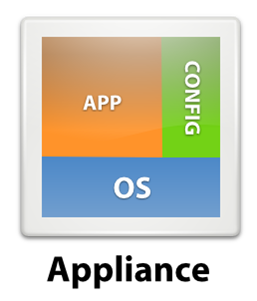 In addition to custom Linux builds, Nat's team has put a
strong focus on Linux-based appliances.
In addition to custom Linux builds, Nat's team has put a
strong focus on Linux-based appliances.
The goal of an appliance is:
- Perform a single task well.
- Requires minimal assembly and setup.
- It comes as a standalone unit.
The idea is that software developers can combine into a single deployable unit (a) the operating system; (b) your software plus any dependencies requires; (c) the proper configuration and data files required to operate.
When you build your appliance with Studio, you can select the kind of system you want, the packages you want to install, you can preconfigure the system and you can even test-drive the result over the web (it uses a Flash applet) and even fine tune or do some last minute touches over the web (inside the Flash applet) before producing your final version:

Test your Linux over the web.
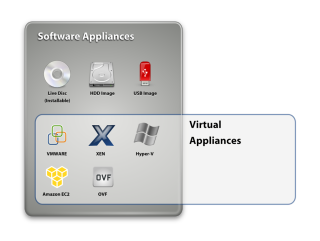 The resulting Linux distribution can be downloaded as an
ISO image, you can update it, you can create a bootable USB
Linux system with your software, generate a VMWare image or
VPC image and next week you should be able to deploy them in
Amazon EC2.
The resulting Linux distribution can be downloaded as an
ISO image, you can update it, you can create a bootable USB
Linux system with your software, generate a VMWare image or
VPC image and next week you should be able to deploy them in
Amazon EC2.
We have been using Studio for building the Mono downloaded VMware/VPC images for a while. We bundle the latest Mono, MonoDevelop and various ASP.NET and Windows.Forms samples for developers to try out.
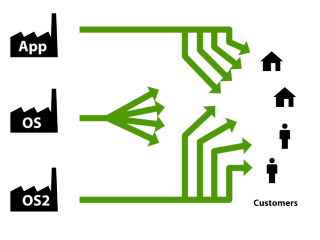
As a software developer, you can move from a world where you let the end users assemble the solution themselves:
Into a setup where you deliver the entire package to your end user:
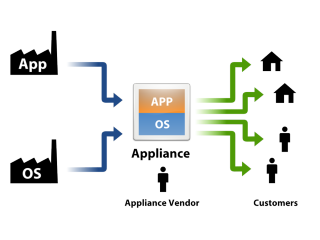
The above scenario is common in the Linux world, non-existent in the OSX world, and only large OEMs are able to do the same on the Windows world.
What we wanted to do was enable anyone, with little Linux expertise to setup their own operating systems. You do not have to be an expert on kernels, boot loading, dependencies or anything else to produce your own operating system.
In addition to Unix software, we are going to make it very easy for Windows developers to bring their applications to Linux. Our Mono for Visual Studio project will now allow developers to go straight from Visual Studio into a Linux powered appliance:

Mono Visual Studio Plugin allows .NET to Appliance compilation.
Posted on 28 Jul 2009
Proposed C# extensions
Scott Peterson has written a proposal to extend C# to support parameterless anonymous methods.
Scott's proposal includes a patch for Mono's C# compiler that implements the suggestion.
The short story is that with this patch allows constructor initializers to also initialize events in an object. So you can now write code like this:
var button = new Button () {
    Label = "Push Me",
    Relief = ReliefStyle.None,
    Clicked +=> Console.WriteLine ("ouch!")
};
Both Bockover and myself love the 3.0 initializer syntax for objects and the only place where the awesomeness broke was the event initialization.
Posted on 27 Jul 2009
Improving Mono's compatibility with .NET CLR
For as long as we remember, most new versions of IronPython, IronRuby or the Dynamic Language Runtime exposed new missing functionality in Mono.
After a major release of any of these tools that deeply exercise the internal Reflection.Emit support and the runtime we would implement the missing features and ship a new Mono version.
As part of the Microsoft/Novell collaboration on Silverlight for Linux, a couple of months ago, we received from Microsoft the test suite for the Silverlight class libraries.
We have been working on fixing all of the issues exposed by the test suite. The test suite exposed bugs in Mono and missing features that are necessary for Silverlight in general, as well as the DLR and the DLR-based languages like IronRuby and IronPython.
We are pretty excited about the progress and the increased compatibility of Mono with Microsoft's .NET.
Posted on 27 Jul 2009
MonoDevelop Refactoring
The other day I did a quick tweet-vey asking folks what they wanted to see in MonoDevelop the most. It turned out that what they wanted the most matched pretty much what we had been working on.
About 50% of the features requested will be in our upcoming MonoDevelop 2.2. One cool refactoring tool is bound to the F2 key. You press F2 in a parameter or local variable, and as you edit the local/variable, all the references in your method are updated accordingly live.
ObScreenshot:
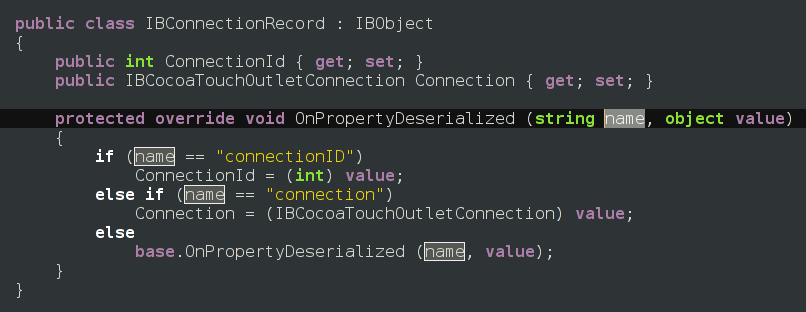
There are many more features on the pipeline, but they deserve more than a quick post-and-run.
Posted on 24 Jul 2009
Using Ruby and Python on Web Clients
 Project Gestalt
allows developers to use Ruby and Python to script their web
UIs.
Project Gestalt
allows developers to use Ruby and Python to script their web
UIs.
The project is powered by Silverlight's Dynamic Language Runtime and the IronPython and IronRuby. This means that they run under a sandboxed JIT engine.
Using it in your web pages is very simple. All you need to do is include in your web page the "gestalt.js" javascript. Once you do that, you can then embed Python or Ruby source code using <script> language="python"<script> or <script> language="ruby"<script>
<body>

<button id="say_hello">Say, Hello!</button>

<script language="python">
def OnClick(s,e):
  document.say_hello.innerHTML = "Hello, World!"

document.say_hello.AttachEvent("onclick",
                   EventHandler[HtmlEventArgs](OnClick))
</script>
</body>
</html>
This addresses a part of Silverlight's story that I always felt was less than ideal. Without the Gestalt script, developers using Ruby or Python had to package their software on a ZIP file before sending down to the client.
Jimmy covers in more detail this important development. We both disliked the ZIP-file deployment model that Silverlight comes out of the box with.
With Gestalt developers can treat Python and Ruby on the client in the same way they have been treating HTML and Javascript. Write code, hit save, refresh page.
Check the samples.
All four pieces (Gestalt, the Dynamic Language Runtime, IronRuby and IronPython) are open source technologies that run on either Microsoft's Silverlight or our own open source Moonlight.
Posted on 22 Jul 2009
Popular Topics on ServerOverflow
In the comments from my previous post someone pointed out ServerFault's question clouds:
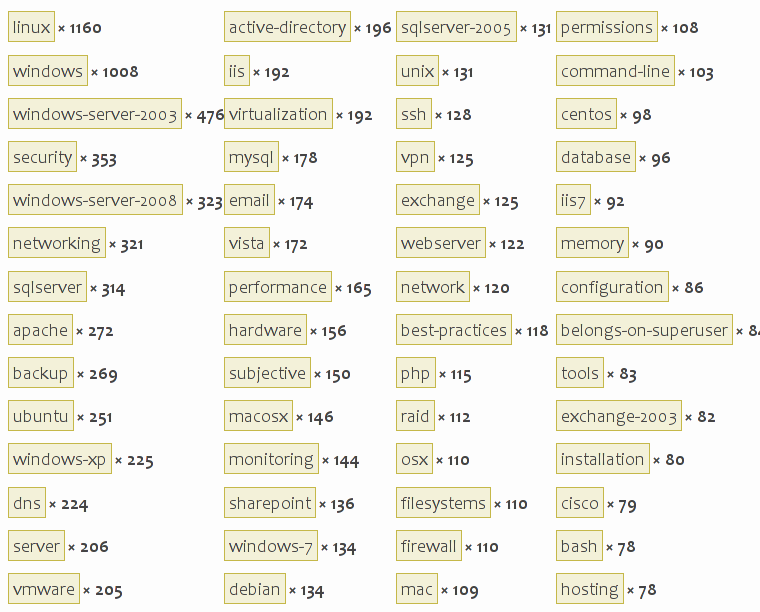
The StackOverflow tags are:
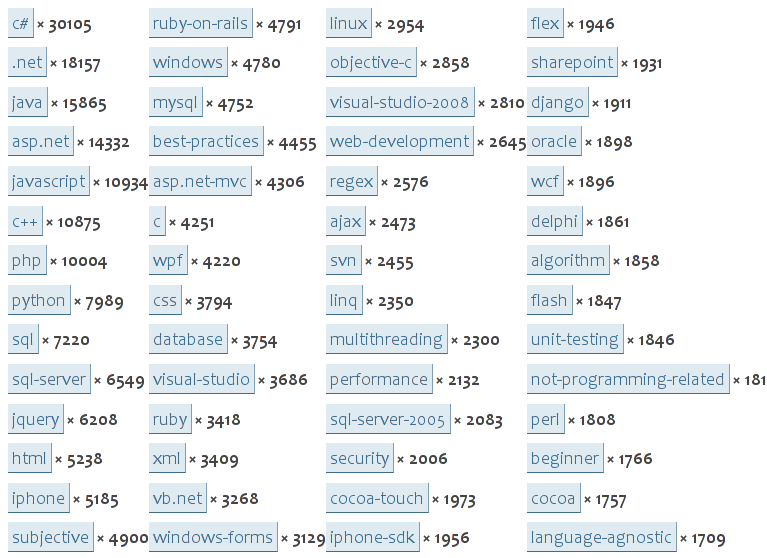
I love to be working, contributing and participating with fabulous people that are advancing the hottest topics of discussion at Stack/Server/Overflow.
Posted on 22 Jul 2009
Popular Topics on StackOverflow
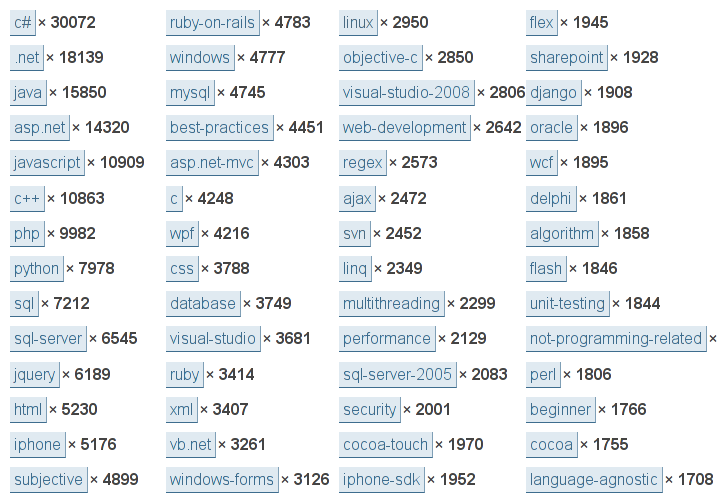
I am probably the last person to find about this, but I find the number of questions/tagged on StackOverflow fascinating:
Posted on 21 Jul 2009
TreemapViewer: Building Silverlight Applications on Unix
A few months ago, to get an idea of what contributed to the size of Mono libraries I wrote a small Treemap visualizer using Moonlight:

Moonlight's assemblies; area represents the codesize.
You can browser the code or get a copy from our AnonSVN repository.
There are a couple of tools here:
- A tool that extracts the sizes of methods for a collection of assemblies (built using Cecil).
- A
Silverlight control
to render treemaps. The code is based on a paper
on how to do treemaps, and I borrowed a couple of
routines from some code I found for WPF.
A Silverlight-based front-end to host this on the web.
An out-of-browser Gtk#-based front-end to run the application locally.
My Treemap is not very ambitious, and it is nowhere as complete as the new Treemap control that is part of the open source Silverlight Toolkit. But it was a fun learning experience for me.
Reusable Engine
I did not really know where we would use this control, on the web or on the desktop when I started. So I split the actual engine that does the heavy lifting from the actual chrome for the application.
This is why I ended up with a Silverlight user interface and a Gtk# user interface. This idea in general might be useful for other developers as well.
The Custom Control
The custom control is very simple, it is called
TreemapRenderer and derives
from UserControl. The code overwrites two
methods: MeasureOverride
and ArrangeOverride. These methods are used to
allow the control to participate in the Silverlight layout
system (for example, the control can be embedded in a table
that can auto-stretch). Silverlight invokes
your MeasureOverride to find out the desired size
that you control would like to consume:
public class TreemapRenderer : UserControl {
	protected override Size MeasureOverride(Size availableSize)
	[...]

	protected override Size ArrangeOverride(Size finalSize)
	[...]
}
Silverlight will invoke your
control's ArrangeOverride to layout its contents
once it has determined the size that the control will use.
This is where my TreemapRenderer lays out its
contents.
This code renders an actual region on the treemap, I like the C# 3.0 initializer syntax for the text created:
public void SetRegion (Rect newRegion)
{
        region = newRegion;
        content.Children.Clear ();
        content.Width = region.Width;
        content.Height = region.Height;

        if (caption != ""){
                int max;
                string formatted = MakeCaption (caption, out max);
                double w = region.Width * 1.60;
                double s = w / max;

                var text = new TextBlock () {
                        FontSize = s,
                        Text = formatted,
                        Foreground = new SolidColorBrush (Color.FromArgb (255, 0x5c, 0x5c, 0x5c))
                };

                Canvas.SetTop (text, (region.Height-text.ActualHeight)/2);
                Canvas.SetLeft (text, (region.Width-text.ActualWidth)/2);
                content.Children.Add (text);
        }

        Rect emptyArea = region;
        Squarify (emptyArea, root.Children);

        Plot (root.Children);
}
To provide feedback to the user, I change the background
color of the treemap on enter/leave. I use anonymous two
anonymous methods, one for MouseEnter, one
for MouseLeave.
Notice that state is shared by these two blocks of code using C# variable capturing. A key feature of the language:
	bool inside = false;
	host.MouseEnter += delegate {
	        host.Background = new SolidColorBrush (Colors.Yellow);
	        if (text != null)
	                text.Foreground = new SolidColorBrush (Colors.Black);
	        inside = true;
	};

	host.MouseLeave += delegate {
	        host.Background = transparentBrush;
	        if (text != null)
	                text.Foreground = borderBrush;
	        inside = false;
	};
One thing that proved very useful was the ability to zoom-into an area. If you click on an assembly, you will get a rendering of the code size used by a type; If you click on that, you get a method breakdown on a class:

drill-down into mscorlib's sizes.
To transition, I added a cute animation where I render the new image and animate it from the area occupied in the larger view into the final size. This is the code that queues the animation:
        // Render a child
        void Clicked (Node n)
        {
		// This is the child rendered, configure it to its final size
                TreemapRenderer c = new TreemapRenderer (n, n.Name);

                Size ns = new Size(region.Width, region.Height);
                c.Measure (ns);
                c.Arrange(region);

		//
		// Scale it and position on the spot that it currently
		// occupies on the screen
		//
                var xlate = new TranslateTransform () {
                        X = n.Rect.X,
                        Y = n.Rect.Y };

                var scale = new ScaleTransform () {
                        ScaleX = n.Rect.Width / region.Width,
                        ScaleY = n.Rect.Height / region.Height };

                c.RenderTransform = new TransformGroup { Children = { scale, xlate } };
                c.Opacity = 0.5;
                content.Children.Add (c);
                activeChild = c;

                //
		// Animate this to its final location
		//
                TimeSpan time = TimeSpan.FromSeconds (0.3);

                var s = new Storyboard () {
                        Children = {
                                Animate (time, xlate, "X", 0),
                                Animate (time, xlate, "Y", 0),
                                Animate (time, scale, "ScaleX", 1.0),
                                Animate (time, scale, "ScaleY", 1.0),
                                Animate (time, c, "Opacity", 1.0),
                        }};

                s.Begin ();
	}

	// Helper method;
        static Timeline Animate (TimeSpan time, DependencyObject target, string path, double to)
        {
                var animation = new DoubleAnimation () {
                        Duration = time,
                        To = to
                };

                Storyboard.SetTarget (animation, target);
                Storyboard.SetTargetProperty (animation, new PropertyPath (path));

                return animation;
        }
The Silverlight Application
Using the control is fairly simple, but since it loads a large XML files (feel free to change this to use a web service) I use the downloader and a callback to render the control.
        private void Application_Startup(object sender, StartupEventArgs e)
        {
	    [...]
            var webclient = new WebClient();
            webclient.DownloadStringCompleted += delegate (object sender2, DownloadStringCompletedEventArgs ee){
                try {
                    RootVisual.Dispatcher.BeginInvoke(() => LoadNodesFromString(ee.Result));
                }
                catch (Exception ex) {
                    main.BackButton.Content = ex.ToString();
                }
            };

            webclient.DownloadStringAsync(new Uri("../mscorlib.xml", UriKind.Relative));
        }
The actual creation of the control happens
in LoadNodesFromString:
        void LoadNodesFromString(String s)
        {
	    // Use Size for the area.
            Node n = LoadNodes(s, "Size", "Extra");
            while (n.Children.Count == 1)
                n = n.Children[0];

            treemap = new TreemapRenderer(n, "");
            Grid.SetColumn(treemap, 0);
            Grid.SetRow(treemap, 1);
            main.grid.Children.Add(treemap);
        }
Building a Gtk# Out-of-Browser Client
The above works great for Silverlight, but I like my application on the desktop, so I created a Gtk# version of it.
Moonlight provides a Gtk# widget that can be embedded into C# desktop applications. This is what it looks like when running on the desktop. I know this screenshot is not too exciting as I did not do much with the Gtk+ side of things:

Gtk# is rendering, seriously.
The core of embedding Moonlight as a Gtk# widget is very simple, here it is:
using Moonlight.Gtk;
using Moonlight;

        public static void Main(string[] args)
        {
                n = LoadNodes (args [0], "Size", "Foo");

                Gtk.Application.Init ();
                MoonlightRuntime.Init ();

		// My container window.
                Gtk.Window w = new Gtk.Window ("Foo");
                w.DeleteEvent += delegate {
                        Gtk.Application.Quit ();
                };
                w.SetSizeRequest (width, height);

		// The Moonlight widget that will host my UI.
                MoonlightHost h = new MoonlightHost ();

		// Add Moonlight widget, show window.
                w.Add (h);
                w.ShowAll ();

                // Make it pretty, skip all levels that are just 1 element
                while (n.Children.Count == 1)
                        n = n.Children [0];

                // Render
                TreemapRenderer r = new TreemapRenderer (n, "");
                Size available = new Size (width, height);
                r.Measure (available);
                r.Arrange (new Rect (0, 0, width, height));

		// This informs the widget which widget is the root
                h.Application.RootVisual = r;
                Gtk.Application.Run ();
        }
There are Visual Studio and MonoDevelop solutions on the SVN for folks to try out.
You can also try a sample live on the web.
Posted on 20 Jul 2009
MiggyTour 2009
In the third and fourth weeks of August, Laura and I will be spending a couple of days in Madrid visiting friends.
Then a couple of days hanging out with Nat, Stephanie and a bunch of awesome friends and family friends in Florence.
And then we are spending a week in Morocco, most likely in Marrakesh.
If you live in Madrid or Marrakesh and would like to get together to meet and talk, send me an email.
Posted on 17 Jul 2009
StackOverflow DevDays in Boston
Joel Spolsky and Jeff Atwood have invited me to participate on StackOverflow's DevDays in Boston on October 7th.
I will be talking about Mono, Mono and Visual Studio and Mono on iPhone. Come equipped with questions.
Shocking, I know.
Posted on 17 Jul 2009
LLVM powered Mono
Mono from SVN is now able to use LLVM as a backend for code generation in addition to Mono's built-in JIT compiler.
This allows Mono to benefit from all of the compiler optimizations done in LLVM. For example the SciMark score goes from 482 to 610.
This extra performance comes at a cost: it consumes more time and more memory to JIT compile using LLVM than using Mono's built-in JIT, so it is not a solution for everyone.
Long running desktop applications like Banshee and Gnome-Do want to keep memory usage low and also would most likely not benefit from better code generation. Our own tests show that ASP.NET applications do not seem to benefit very much (but web apps are inherently IO-bound).
But computationally intensive applications will definitely benefit from this. Financial and scientific users will surely appreciate this performance boosthttp://www.mono-project.com/.
Taking it out for a spin
Note: the notes here are no longer relevant, these applied to Mono back in 2009. LLVM has now been integrated into Mono, follow the steps in http://www.mono-project.com/Mono_LLVM instead
You need to install both LLVM and Mono from SVN.
Get and install LLVM like this:
$ svn co http://llvm.org/svn/llvm-project/llvm/trunk llvm
$ cd llvm
$ ./configure --prefix=/mono --enable-optimized
$ make && make install
Then get Mono, and you need to apply a tiny patch to configure.in.
$ wget https://tirania.org/tmp/m7a9da378.txt
$ svn co svn://anonsvn.mono-project.com/source/trunk/mcs
$ svn co svn://anonsvn.mono-project.com/source/trunk/mono
$ cd mono
$ patch -p1 < m7a9da378.txt
$ ./autogen.sh --prefix=/mono --enable-llvm=yes
$ make && make install
Now you have an LLVM-powered Mono.
LLVM is not able to support some of the features that Mono needs, so in those cases the JIT compiler will still fall back to Mono's JIT engine (methods that contain try/catch clauses or methods that do interface calls).
This backend was written by Zoltan.
Posted on 16 Jul 2009
Banshee as a Platform?
Aaron Bockover recently discussed Banshee's modular architecture. Aaron discusses using Banshee as a foundation for managing not only music, and videos but merging with F-Spot to manage photos as well:

The slides from his talk go into a bit more detail.
Jonathan Pobst takes the platform idea one step further and suggests that Banshee's core could also be used to replace YAST's Software Installer UI:

Jonathan says:
Every time I use YaST's Software Manager, I wonder if it would be better implemented using Banshee. Banshee's interface has been tuned for usability, both on its own, and what it borrows from iTunes. Software management is a naturally scary operation, and using an interface that the user is already familiar with could help reduce user fear.Of course, it would just be the interface pieces of Banshee in a new app, you wouldn't actually start Banshee for software installation.
Another feature I would like to see taken from iTunes/Banshee is downloading/installing in the background. Once I hit Install, go ahead and download the application in the background, and install it in the background. I can click on the "Downloading/Installing.." menu item if I want to see what's going on. Most of the time, I'd rather be looking at other things to download.
I think this is a brilliant idea.
Posted on 15 Jul 2009
From Microsoft: C# and CLI under the Community Promise
First the big news: Microsoft will be applying the Community Promise patent licensing to both C# and the CLI.
The announcement was done by Peter Galli at Microsoft over at Port25 and it states (emphasis is mine):
I have some good news to announce: Microsoft will be applying the Community Promise to the ECMA 334 and ECMA 335 specs.ECMA 334 specifies the form and establishes the interpretation of programs written in the C# programming language, while the ECMA 335 standard defines the Common Language Infrastructure (CLI) in which applications written in multiple high-level languages can be executed in different system environments without the need to rewrite those applications to take into consideration the unique characteristics of those environments.
"The Community Promise is an excellent vehicle and, in this situation, ensures the best balance of interoperability and flexibility for developers," Scott Guthrie, the Corporate Vice President for the .Net Developer Platform, told me July 6.
It is important to note that, under the Community Promise, anyone can freely implement these specifications with their technology, code, and solutions.
You do not need to sign a license agreement, or otherwise communicate to Microsoft how you will implement the specifications.
The Promise applies to developers, distributors, and users of Covered Implementations without regard to the development model that created the implementations, the type of copyright licenses under which it is distributed, or the associated business model.
Under the Community Promise, Microsoft provides assurance that it will not assert its Necessary Claims against anyone who makes, uses, sells, offers for sale, imports, or distributes any Covered Implementation under any type of development or distribution model, including open-source licensing models such as the LGPL or GPL.
You can find the terms of the Microsoft Community Promise here.
I told you this was good news!
A few months ago we approached Bob Muglia and Brian Goldfarb (@bgoldy) at Microsoft with a request to clarify the licensing situation for the ECMA standards covering C# and the CLI (also ISO standards, for the ISO loving among you).
Previously Microsoft had detailed the patent license plans and today they have delivered on those plans.
Astute readers will point out that Mono contains much more than the ECMA standards, and they will be correct.
In the next few months we will be working towards splitting the jumbo Mono source code that includes ECMA + A lot more into two separate source code distributions. One will be ECMA, the other will contain our implementation of ASP.NET, ADO.NET, Winforms and others.
Depending on how you get Mono today, you might already have the this split in house or not.
Thanks to everyone at Microsoft that worked to get this approved and released. We appreciate that they made this a priority when we approached them, and we know that everyone in the .NET team was also incredibly busy with various betas: .NET 4, Visual Studio 2010, Silverlight, MVC, MEF and much more.
I am overflowing with joy right now. Cheers!
Update: Send your thanks to @bgoldy on tweeter, who crossed all the t's and dotted all the i's to make this happen.
Update: Moderation of comments is taking place. Off topic messages will be removed immediatly. Trolling, as mild as it might be will be deleted. If you want to argue what language is the best one take the debate to a newsgroup.
Posted on 06 Jul 2009
PhyreSharp runs on the PS3
Mono on the PS3 has been making some nice progress. Supporting the PS3 requires some special features in Mono, for instance, a static compiler for .NET code for the PowerPC/Cell processor.
PhyreSharp, our .NET binding to Sony's PhyreEngine game engine ran on Thursday for the first time.
Posted on 03 Jul 2009
Blog Search
Archive
- 2024
Apr Jun - 2020
Mar Aug Sep - 2018
Jan Feb Apr May Dec - 2016
Jan Feb Jul Sep - 2014
Jan Apr May Jul Aug Sep Oct Nov Dec - 2012
Feb Mar Apr Aug Sep Oct Nov - 2010
Jan Feb Mar Apr May Jun Jul Aug Sep Oct Nov Dec - 2008
Jan Feb Mar Apr May Jun Jul Aug Sep Oct Nov Dec - 2006
Jan Feb Mar Apr May Jun Jul Aug Sep Oct Nov Dec - 2004
Jan Feb Mar Apr May Jun Jul Aug Sep Oct Nov Dec - 2002
Jan Feb Mar Apr May Jun Jul Aug Sep Oct Dec
- 2022
Apr - 2019
Mar Apr - 2017
Jan Nov Dec - 2015
Jan Jul Aug Sep Oct Dec - 2013
Feb Mar Apr Jun Aug Oct - 2011
Jan Feb Mar Apr May Jun Jul Aug Sep Oct Nov Dec - 2009
Jan Feb Mar Apr May Jun Jul Aug Sep Oct Nov Dec - 2007
Jan Feb Mar Apr May Jun Jul Aug Sep Oct Nov Dec - 2005
Jan Feb Mar Apr May Jun Jul Aug Sep Oct Nov Dec - 2003
Jan Feb Mar Apr Jun Jul Aug Sep Oct Nov Dec - 2001
Apr May Jun Jul Aug Sep Oct Nov Dec